What's the Best Barcode Scanning SDK for a Browser-Based Inventory App? A Developer's Comparison Guide

Browser-based inventory applications are becoming increasingly popular among businesses that want to manage stock, track products, and process warehouse operations without installing dedicated desktop software or native mobile apps.
Barcode scanning is an essential part of these workflows. Whether employees are receiving shipments, updating stock quantities, picking orders, or conducting inventory audits, they need a reliable way to scan product labels using a laptop webcam or smartphone camera.
But choosing the right barcode scanning SDK can be challenging. Developers must consider scanning accuracy, browser compatibility, supported barcode formats, camera performance, integration complexity, and scalability.
So, what's the best barcode scanning SDK for a browser-based inventory app? Let's compare the available options and explore what developers should evaluate before making a decision.
Why Do Browser-Based Inventory Apps Need a Barcode Scanning SDK?
Traditional inventory systems often depend on handheld barcode scanners connected to computers. However, modern web applications can use built-in cameras to scan barcodes directly from browsers.
This approach offers several advantages:
No dedicated scanning hardware: Employees can use existing smartphones, tablets, or laptops.
Simpler deployment: Users can access inventory tools through a browser without installing a separate application.
Real-time inventory updates: Scanned barcode data can be sent directly to inventory databases.
Flexible workflows: Businesses can support stock receiving, product lookup, order picking, and inventory counting from one interface.
However, camera access alone does not guarantee reliable scanning. Barcode recognition software must accurately decode information under different lighting conditions, camera angles, distances, and barcode quality levels.
That's where a dedicated JavaScript barcode scanning SDK becomes useful.
What Should Developers Look for in a Barcode Scanning SDK?
Before comparing specific solutions, consider these important requirements.
1. Barcode Recognition Accuracy
Inventory labels are not always in perfect condition. They may be scratched, blurry, folded, poorly printed, or difficult to capture because of lighting and camera limitations.
A suitable SDK should reliably recognize supported barcode formats under realistic operating conditions.
2. Barcode Format Support
Inventory applications may need to scan different barcode types depending on the industry.
Common formats include:
UPC-A and UPC-E for retail products.
EAN-8 and EAN-13 for product identification.
Code 128 and Code 39 for warehouse labels.
QR Code and Data Matrix for additional product information.
Choose an SDK based on the actual barcode formats used in your inventory workflow.
3. Browser and Device Compatibility
The scanning solution should work across commonly used browsers and operating systems.
Check compatibility with Chrome, Safari, Firefox, and Edge, along with Android and iOS mobile browsers. Camera behavior can vary between devices, so real-device testing is essential.
4. Real-Time and Multiple Barcode Scanning
For simple product lookup, scanning one barcode at a time may be sufficient. However, warehouse applications may require employees to scan multiple products quickly.
Evaluate whether the SDK supports continuous video scanning, multiple barcode detection, duplicate handling, and configurable scanning regions.
5. Integration and Scalability
A barcode SDK should integrate with your existing JavaScript application and backend inventory system without requiring a complete architectural redesign.
Also evaluate documentation, sample projects, licensing, technical support, and long-term maintenance.
Comparing Popular Barcode Scanning SDKs for Web Applications
Here are some solutions developers can consider when building browser-based inventory applications.
1. Dynamsoft Barcode Reader
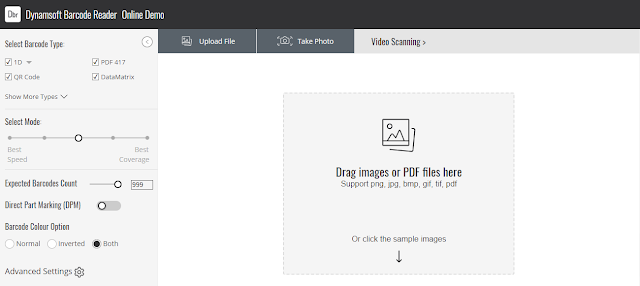
Dynamsoft Barcode Reader provides a JavaScript SDK for integrating barcode scanning directly into web applications.
It uses WebAssembly-based processing to decode barcodes in the browser, allowing applications to access camera input without requiring users to install a separate scanning application.
Key capabilities:
Supports UPC-A, UPC-E, EAN-8, EAN-13, Code 128, Code 39, QR Code, Data Matrix, PDF417, and other formats.
Real-time scanning through browser cameras.
Recognition capabilities for challenging barcodes, including blurry, damaged, angled, and low-light conditions.
Customizable scanning settings and templates.
Integration options for JavaScript frameworks and progressive web applications.
Best for: Inventory management platforms, warehouse applications, retail systems, and enterprise web applications where scanning reliability and customization are important.
Explore the Dynamsoft JavaScript Barcode Reader SDK.
2. ZXing-JS
ZXing-JS is an open-source barcode scanning library that provides browser-based decoding capabilities.
Developers can use its browser package to scan barcodes from webcams, video elements, images, and other supported sources.
Key capabilities:
Open-source implementation.
Support for multiple 1D and 2D barcode formats.
Browser camera integration.
Image and video-based decoding.
Useful for lightweight scanning implementations.
Best for: Developers building prototypes, smaller inventory applications, or projects where open-source software and control over implementation are priorities.
Consideration: The ZXing-JS library is currently in maintenance mode, with development focused mainly on contributed bug fixes and minor enhancements. Evaluate its maintenance status before selecting it for a long-term production application.
3. Scandit Barcode Scanner SDK for the Web
Scandit provides a JavaScript-based barcode scanning SDK designed for web applications and enterprise workflows.
It offers scanning capabilities for mobile and desktop browsers, along with additional tools for guided scanning and multiple barcode capture.
Key capabilities:
Support for common retail and industrial barcode formats.
Browser-based camera scanning.
Multiple barcode scanning capabilities.
Scanning interfaces and workflow components.
Support for JavaScript and TypeScript applications.
Best for: Enterprise inventory, logistics, retail, and warehouse applications that require advanced scanning workflows and guided user experiences.
JavaScript Barcode SDK vs. Native Browser Barcode Detection API
Developers may also consider the browser's native Barcode Detection API.
Unlike third-party SDKs, this API provides built-in barcode detection capabilities in supported browsers without requiring an external decoding library.
However, browser support and available barcode formats are not consistent across all environments. Developers should also consider fallback handling when the API is unavailable.
A dedicated JavaScript SDK may be a more practical choice when an application needs consistent functionality across different browsers, broader barcode format support, advanced recognition capabilities, or vendor-provided technical support.
How to Integrate Barcode Scanning into an Inventory Application
A typical browser-based inventory workflow looks like this:
Open the camera: Request camera permission through the browser.
Initialize the scanning SDK: Load the JavaScript library and configure the required barcode formats.
Capture barcode data: Decode barcodes from live camera frames.
Process the result: Extract the decoded barcode value and validate it.
Connect to the inventory database: Send the barcode value to the backend to retrieve the corresponding product record.
Update inventory: Allow users to update stock quantities, confirm product details, or process orders.
For example, when an employee scans a product's UPC, the application can retrieve its product record and display the current stock quantity. The employee can then update the inventory without manually entering product information.
Importantly, the barcode scanning SDK handles barcode recognition. Product identification, inventory records, and stock updates are managed by the application's backend and database.
So, Which Barcode Scanning SDK Should You Choose?
The best SDK depends on your application's requirements, development resources, and expected scanning environment.
For enterprise inventory applications: Consider Dynamsoft or Scandit when scanning reliability, customization, and advanced workflows are important.
For lightweight projects and prototypes: ZXing-JS can be a useful open-source starting point, provided its maintenance limitations are acceptable.
For basic browser-native experiments: The Barcode Detection API may be worth evaluating where browser support is sufficient.
For production inventory applications, testing is more valuable than relying on feature lists alone. Evaluate each SDK using actual product labels, different camera devices, lighting conditions, and scanning distances.
A reliable barcode scanning experience can reduce manual data entry, minimize inventory errors, and make everyday warehouse operations more efficient.
The right SDK is not simply the one that reads a barcode under ideal conditions. It is the one that performs consistently in the real working environment where your inventory application will be used.


Comments
Post a Comment