Posts

Streamline Document Management with an Online Document Scanner

Image
Document scanning simplifies the process of digitizing physical documents, streamlining document management, and eliminating the need for dedicated scanning equipment. It offers a flexible and convenient solution for individuals and businesses to transition from paper-based to digital document workflows. All these things are achievable with the web-based document scanning tool by Dynamsoft The Online Document Scanner is a web-based tool that allows users to scan physical documents and images directly from their computer or mobile device. With this scanner, users can capture high-quality images of documents, invoices, receipts, or any other paper-based content. Once the document or image is scanned, it can be previewed and edited if necessary. Users can then save the scanned document as a digital file in popular formats like PDF or JPEG.

Dynamsoft Document Scanning SDK Offers Built-in Viewer and Editing Capabilities

Image
DWT document scanning SDK  allows users to view and edit scanned documents within their applications.  Viewing: The SDK provides a high-quality, multi-page document viewer that supports various image formats such as PDF, TIFF, JPEG, and PNG. Users can zoom in and out, rotate pages, and navigate through pages easily. Editing: The SDK offers basic editing functions such as crop, deskew, and sharpen to improve the quality of scanned images. Users can also add annotations, comments, and watermarks to the documents.

Working with Web-Based QR Code Scanner and Barcode Detection API.

Image
Dynamsoft offers  QR code scanning API that allows developers to integrate QR code scanning and barcode detection capabilities into their web applications quickly.  Features of the API: Including real-time scanning Support for various barcode types Customization options Cross-platform compatibility.  It also offers sample codes and documentation for developers to quickly implement QR code scanning and barcode detection in their web applications.

Add Barcode Scanning Function in Android App

Image
Dynamsoft Barcode Reader SDK for Android is a software development kit that allows developers to add barcode scanning capabilities to their Android applications. It supports various types of 1D and 2D barcodes, including QR codes, Data Matrix codes, and UPC codes, and provides fast and accurate barcode recognition. The android barcode reader SDK is easy to integrate into Android apps and supports multiple programming languages.

Scan Barcode Online Using Dynamsoft Demo

Image
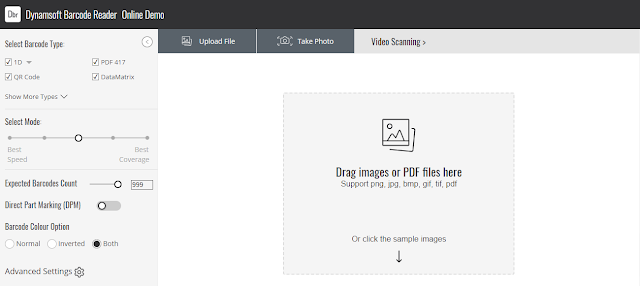
Follow these steps to scan a barcode online using Dynamsoft demo: Go to the Dynamsoft Barcode Reader demo page. Click on the "Select Image" button to upload an image containing the barcode you want to scan. You can use the sample image provided on the page or upload your own image. Once the image is uploaded, the page will automatically scan it for barcodes. If a barcode is detected, the barcode information will be displayed in the results section of the page. You can adjust the scanning settings by clicking on the "Settings" button. From here, you can choose which types of barcodes to scan for, adjust the scanning speed, and more. That's it! You can now use the Dynamsoft Barcode Reader demo to scan barcodes online .

Scanning Problems with Code 39 Barcodes

Image
Code 39 Extended with Zero-Margin is used in applications where a compact representation of data is desired, and where the barcode can be read by a scanner with a high level of accuracy. This barcode setting is very tight causing code 39 barcode not to scan . Dynamsoft uses advanced image processing and scanning algorithms to solve the challenges posed by Code 39 Extended with Zero-Margin barcodes. The following are some of the ways in which Dynamsoft addresses these challenges: Image Enhancement Barcode Detection Decoding Error Correction

What are the Uses of Barcodes in Pharma Industry?

Image
  There are several uses of barcodes in the pharmaceutical industry, including: Medication administration: Barcode scanning is used to confirm that the correct medication is being administered to the right patient at the correct time and dosage. Inventory management: Barcodes are used to track the movement of products throughout the pharmaceutical supply chain , from the manufacturer to the distributor to the retail pharmacy. Sample tracking: In clinical trials, barcodes are used to track the movement of drug samples from the manufacturer to the research facility and then to the patients. Drug packaging: Barcodes are used to identify the product and provide important information such as dosage, expiration date, and manufacturer information. Patient identification: Barcode scanning is used to confirm the identity of patients in hospitals and clinics to ensure accurate medication administration and medical records. Traceability: Barcodes are also used to track and trace the supp...